




My homelab journey actually began this summer! I've come a long way in six months being a total newbie. It started with an impulse buy of an N100 based laptop that I bought, determined to finally learn Linux after trying to make the switch several times previously. Watching Linux videos on youtube led me to finding your channel and becoming exposed to the world of self-hosting and homelabbing in general. I went from one linux laptop, to standing up a ubuntu server on an old gaming PC that was just sitting in the basement, to then deploying a mini-PC as a OPNsense vm on proxmox... and now I've just stood up a Minisforum N5 (running TrueNAS virtually on proxmox) and another GMKtec M7 mini-pc also running proxmox that will become the new home for my services once I get them migrated over from the ubuntu server.
It's nothing fancy, but I'm really coming to appreciate the efficiency and convenience of these mini pcs. In 2026, I'll probably plan on focusing on upgrading my networking stack and getting into self-hosting LLMs! I feel more excited about taking on "tech projects" than I ever have before and am really excited to have found homelabbing as a hobby for myself and to provide services for my family.
Again, nothing fancy but here is my mini-homelab:
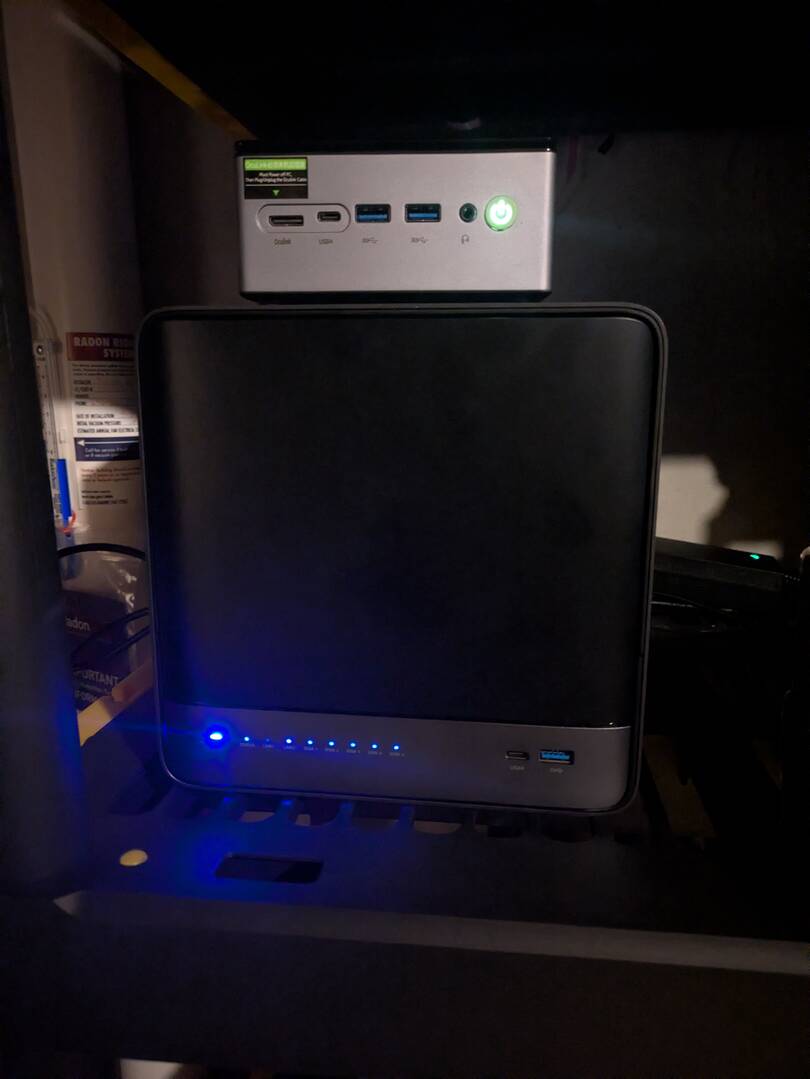
Between the two its 2x AMD CPUs (16 cores, 32 threads total)
96GB of LPDDR-5600
40TB (5x8GB) RAIDZ1 array
an open PCIe port for future nvme expansion
Plenty for my current needs with some headroom for future projects.


Current Setup
Everything is second hand except my boot drives, NAS storage drives and APs. I work in IT so sometimes when clients upgrades they as us to take the old machine to e-waste.
Network:
- Hardware firewall (local brand I work with)
- Ubiquity 24 port POE Edge switch
- Netgear 24 port non-POE switch
- Raspberry Pi 3 B+ with Pi-Hole
Layout:
- VLAN1 AKA Flat-LAN - All lab, and personal devices
- VLAN30 AKA Zoo - IOT devices
- VLAN59 AKA GreenZone - CCTV cameras and guests
- VLAN21 AKA FOB - Any device with port forwards - currently only NVR
NAS: Pithos
Runs Ubuntu Server 24-04 with MergerFS for data pool (no redundancy needed in my case), SMB, NFS & Syncthing (my PC syncs everything to the NAS and also backsup critical info to a cloud).
- i5 6th gen
- 4GB RAM
- 128GB Boot drive
- 2x 10TB Storage drives
Proxmox Node: ProxBox
- Ryzen 5 2600
- 48GB RAM
- 1TB Boot NVME (also houses VM storage, images & latest backup)
Supervisor VM (Docker Host)
- Nginx Proxy Manager
- Authentik
- Dockge
Orchestrator VM (Docker Host)
- n8n
Docker 2 VM (Docker Testing)
- Wazuh
Standalone LXCs
- Grist LXC
- Spoolman LXC (Helper Script)
- Ollama LXC
- Jellyfin
- Jellyseerr
- qBitTorrent
- Prowlarr
- Sonarr
- Radarr
- Lidarr
- Bazarr
Other VMs
- Fossil-PC (Windows 7 for a couple CCTV cameras that need Internet Explorer)
- Fedora Workstation testing (test apps and install methods before deploying it on my daily-drive PC)
- Fedora Cosmic testing (to see how Cosmic desktop is coming along)
- Windows 11 testing (I can't remember what this was for)
Home Assistant
i5 4th gen Mecer Mini PC with 245GB boot drive & 8GB RAM.
- DIY irrigation system in the back yard with ESP Home
- Alarm system automation - mostly broken due to API limits, when it worked I used the door open/closed states to trigger other automations and send notifications, now it is just scheduling
- Sunsynk Inverter - Used to use SolarSynk AddOn, but it no longer wants to connect to the inverter so I am rebuilding with KellerZA/SunSynk integration.
- Yeelights - got them as a discount sample form a supplier so I hooked them up, currently turns on around the time I usually feed the dogs.
2025 Changes
Home Assistant: Used to be a VM in ProxBox, but found a mini PC for a steal at a pawn shop and went bare-metal.
Pithos: Used to be a VM in ProxBox with drives passed through, but ended up with a client's e-waste PC (one busted RAM slot), so I transferred it to bare-metal.
ProxBox: Upgraded boot & VM storage from a 512GB NVME + 128GB SATA SSD to single 1TB NVME. Added 32GB RAM
2026 Changes
Home Assistant:
- Add Sonoff RF bridge and RF door magnets to replace the door open/closed state triggers that I lost with the alarm
- Add Sonoff Zigbee dongle to use with Zigbee no-neutral light switches (will pull in neutral to a couple as needed to use them as router)
- Add Zigbee water leak sensors to dishwasher, kitchen sink, and washing machine
- Ass Zigbee vibration sensors for washer & drier notifiactions
- Duplicate current ESP Home irrigation for the front yard
- Design and build ESP Home multi-sensor ceiling puck (similar look to Unifi AP) for temp, humidity, mmWave, IR Remote (rooms with dumb air-conditioners) - realistically this will only happen in 2027
- DIY ESP Home car-port gate and pedestrian gate triggers
Pithos:
- Add another 10TB+ drive or 2
- Upgrade PSU (I'm out of SATA ports)
Proxbox:
Orchestrator VM:
- Add WatchTower or alternative (looking at WUD right now)
- Add Teraform
- Add Ansible
Observer VM (Docker Host):
- Add Checkmk
- Maybe add something logging
- Maybe add Wazuh
- Might switch Checkmk for Prometheus & Grafana if I prefer them
- Might add Apprise if the need for a dedicated notification system comes in (right now n8n does it via Telegram after some basic checks)
Servarr VM (Docker Host):
- Remove all standalone Arr services and add to a single VM, except Jellyfin which is staying standalone.
Docker VM (Docker Host):
- Any miscellaneous Docker containers I want to run full time
Standalone LXCs:
- Add Obico for 3D Printer monitoring
- Rebuild Spoolman from scratch without helper script
Hardware: Add a GTX 1070 of later and do shared GPU passthrough for Ollama, Jellyfin, and Obico.
Network:
- Replace the switches for a single 48 port, or 2 fully working 24 ports.
- Cable management in the rack
Story & Goals
I grew up on Windows and always put any shared media and documents on a Windows Share on my PC. At some point I ended up with some Amazon NAS that had a tiny IDE drive for boot and 4 drive bays in a compact format that I wanted to turn into a server. I came across OpenMediaVault and YouTubed my way to a working NAS which was great for the a couple years until the board died (it was e-waste when I got it).
Enter random i3 PC that was laying around (yes, also e-waste). I wanted to try something new and a friend had suggested Ubuntu with Webmin, so I ran that for a while.
Enter Dell Tower Server - Xeon something with 32GB RAM and a bunch of SAS drives of unknown age. You guessed it, e-waste. I spent most of early Covid fiddling with that, finding out about Proxmox and trying to figure out why the machine doesn't boot properly (damaged drive), and eventually got it working with Proxmox. This started my first iteration of today's ProxBox, then named pve.
pve ran that same Pithos VM that I killed earlier in the year, just without Syncthing, ran a Plex VM (didn't understand LXC yet), and a Windows Deployment Server VM (did this ever really work or was I just late to the party?)
When things started opening again a few months into Covid I got a new boot drive for pve, reloaded from scratch and named it Victor. I rebuilt Pithos as it was, rebuilt Plex into an LXC, restored my backup snapshot of Windows Deployment Server, and started playing with the Arr stack. I also added a Pi-Hole LXC, a pfsense VM, and at some point I had a WordPress testing VM on Victor, and I ran a QR Code server for a while as well.
The Dell server was fine for a few years when I had a makeshift server room (it was built for a 48U server rack with 3 crypto mining rigs and every GPU FB marketplace had to offer), but when Ethereum went POS, the rigs were sold and 'server room' broken down. Then the Dell was just too loud. I traded it for a Ryzen 5 3600 PC, and my former PC became the new server, it's name, Pandora (I have thing with names, even my 3D printers have them, but Proxmox is the only one that I never like long term). Pandora ran mostly the same things as Victor, but the Windows Deployment, WordPress and QR Code servers where no longer around. I have also swapped Plex for Jellyfin somewhere in this time and expanded my Arr stack into the standalone LXCs that I currently have.
When Proxmox 9 came out I decided to upgrade the boot drive and rename it to ProxBox. I also wanted to dive a little deeper into actually building the VMs and figuring out how they worked, rather than just copy-pasting helper scripts or parroting along with a YouTube video. Until now my end goal was having the working service, but now I want to learn more about how the service actually works under the hood. I had also been very opposed to Docker because I didn't understand it, and every time I tried doing something while following a video there would be something I change for my use case that broke it all (usually to do with volumes & permission). I am starting to see why everyone loves Docker so much, and have even gotten tempted to try Podman, but I think learning one at a time is a better move. Realistically I'll be rebuilding ProxBox in a year or two anyway, so I can transition everything to Podman then.
I also want to look at trying NextCloud again, I ran it briefly back on OpenMediaVault, but never really implemented it since I was daily-driving Windows and shortly after Mac (not e-waste for once, this one I actually bought on marketplace). I've been daily-driving Fedora the last year and replaced OneDrive with Syncthing for my off-device data sync (insert OneDrive alone isn't a backup rant here), and then I have an encrypted Deja Dup sending a copy off everything to OneDrive for off-site A, and an Acronis backup of "can't loose this stuff" for off-site B. I might swap Syncthing for Nextcloud if I like it, it will be convenient for the 3 times a year I leave the house and want to access a file on my phone, but I'm worried about speed since I've seen a lot of Reddit complaints about that, but I think it's outdated info.
I also want to start playing a little more with network security, and want to re-construct my VLAN layout so that stuff like the lab is on a dedicated VLAN, but Proxmox VLANs and I don't get a long yet.
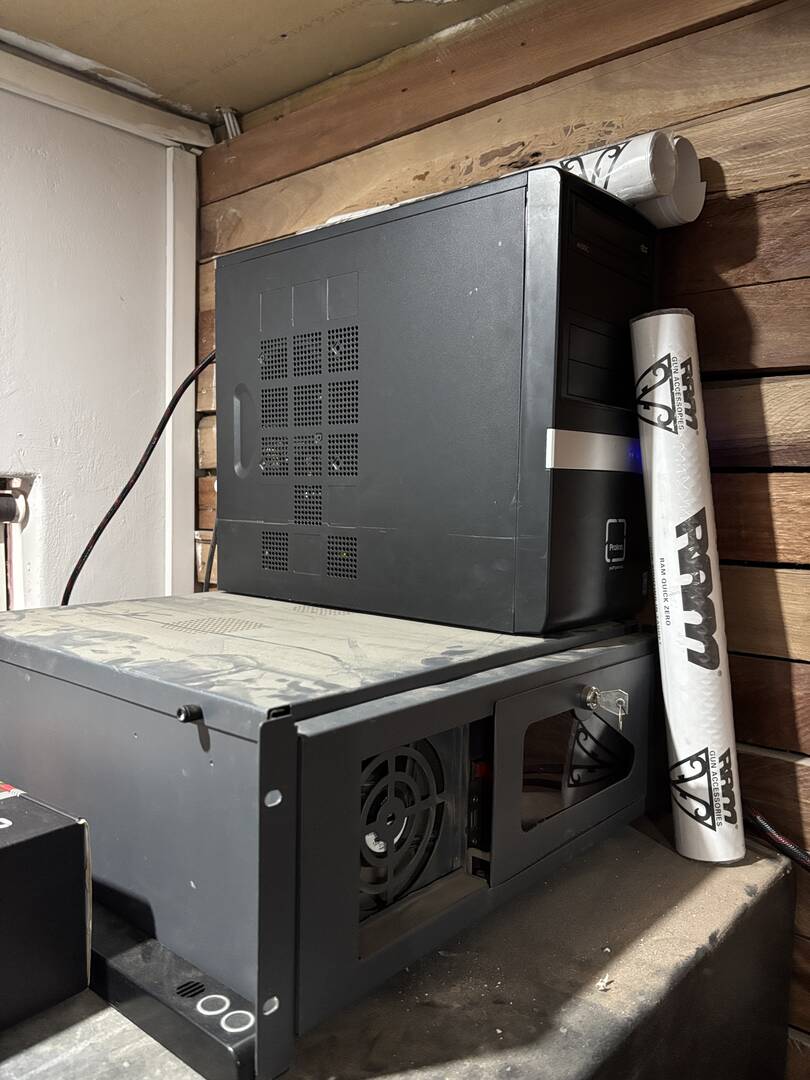
My server rack is only 400mm deep so the NVR lives on top of it. The cable management was better, but some ports on the Edge Switch have started dying (which is why I added the Netgear), and now it is a crow's next.

Shallow server rack also means ProxBox (bottom) and Pithos (top) live on top of the safe in the next room. (I really need to dust off up there.)

New for 2025, moved from VMWare ESX to ProxMox 9 (huge upgrade) with clustered setup on a pair of DL360 G9s, added docker servers to my lab, and started with LXC containers. Working in IT, I run scaled down version of infrastructure we have at work to learn and explore. Also dove into PiHole for front end DNS and TailScale for VPN replacement for remote and always on access to the network. Of course running Plex and the *ARR suite, with 4 NAS devices with 34TB, 22TB, 18TB and 12TB of storage on each for media, backups, and NVR

Welcome to my homelab! Who doesn't love the opportunity to geek out over their lab?
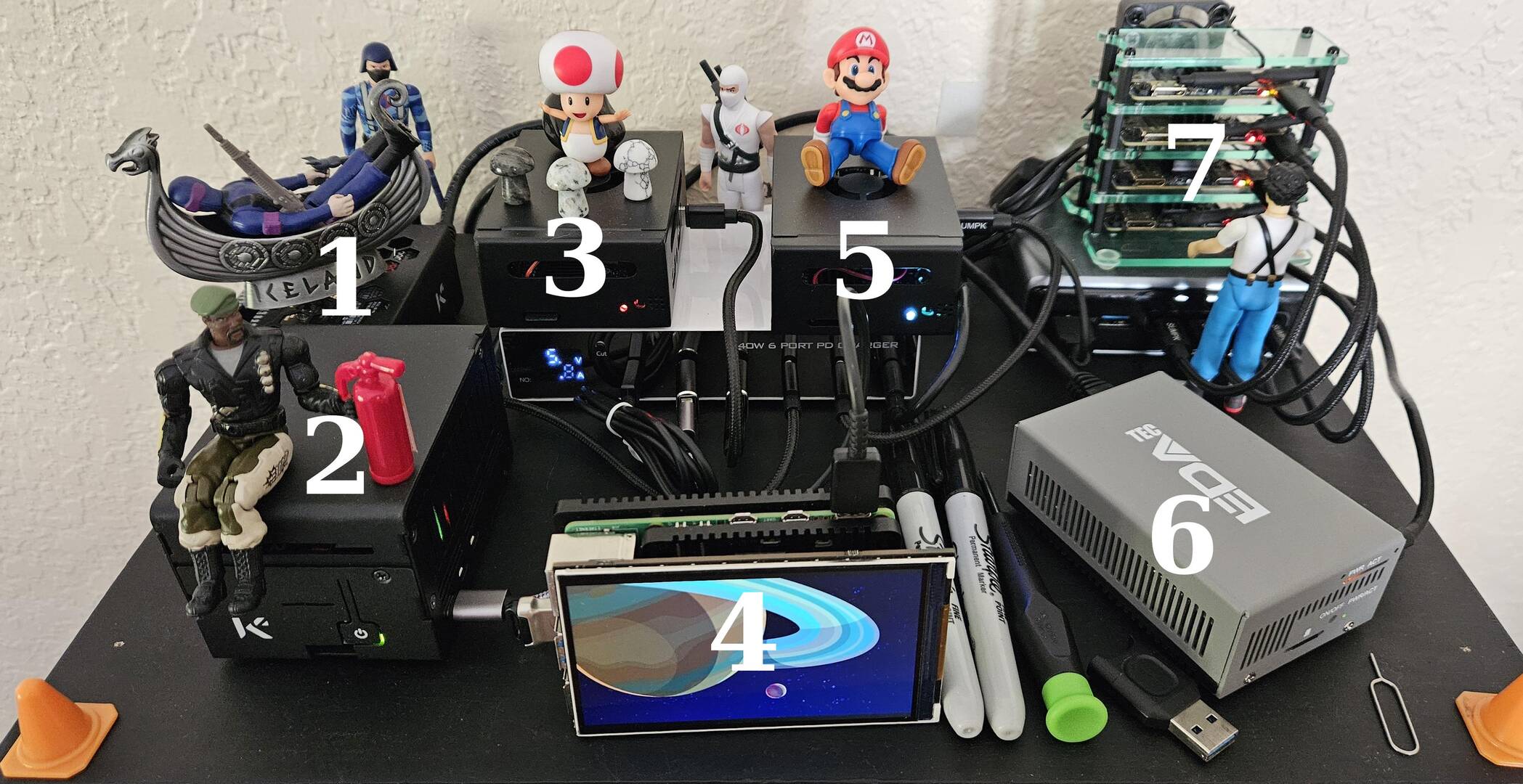
1. Raspberry Pi 5 - 8 GB, Raspberry Pi OS lite bookworm, runs Twingate client to connect to remote Syncthing instance, and runs Docker containers:
* Syncthing - receive-only secondary instance
* FileBrowser - web-facing file browser UI hosted via Cloudflare tunnel, set up as read-only
2. Raspberry Pi 5 - 8 GB, Raspberry Pi OS lite bookworm, hosting the Cloudflare tunnel, and running Docker containers:
* Apache - 6 x containerized websites, hosted via Cloudflare tunnel
3. Orange Pi 5 Ultra - 8 GB, DietPi OS trixie, hosting my primary SAN via SMB, runs Twingate client to connect to remote Syncthing instance, and runs Docker containers:
* Syncthing - primary instance, syncing to two other instances, and receives cell phone pictures via Android Syncthing instance
4. Raspberry Pi 5 - 8 GB, Raspberry Pi OS desktop trixie, dev machine currently hosting a Kurzegesagt picture frame on a 4" Hyperpixel display. I mostly use it to test new containers, creating containers, and Docker swarm testing (manager node)
5. Orange Pi 5 Ultra - 16 GB, DietPi OS trixie, running Docker containers:
* Pihole - primary
* Uptime Kuma - primary, web facing UI via Cloudflare tunnel
* Speedtest Tracker - primary, verifying 1.2 GBPS speeds, and testing internet stability through my switch, web facing UI via Cloudflare tunnel
* Open Web UI/Ollama - primary, web facing UI via Cloudflare tunnel
* Twigate tunnel connectors - primary, secondary
* Signal cli client - primary, used for Uptime Kuma notifications
6. Raspberry Pi 5 - 8 GB, Raspberry Pi OS lite trixie, running Plex in a Docker container. Also hosts an SMB share for adding Plex media
7. 4 x Orange Pi Zero 2 W - 4 GB, Armbian OS lite trixie, used for Docker swarm testing (worked nodes). This mini-cluster is cooled with a USB-powered dual-40mm fan
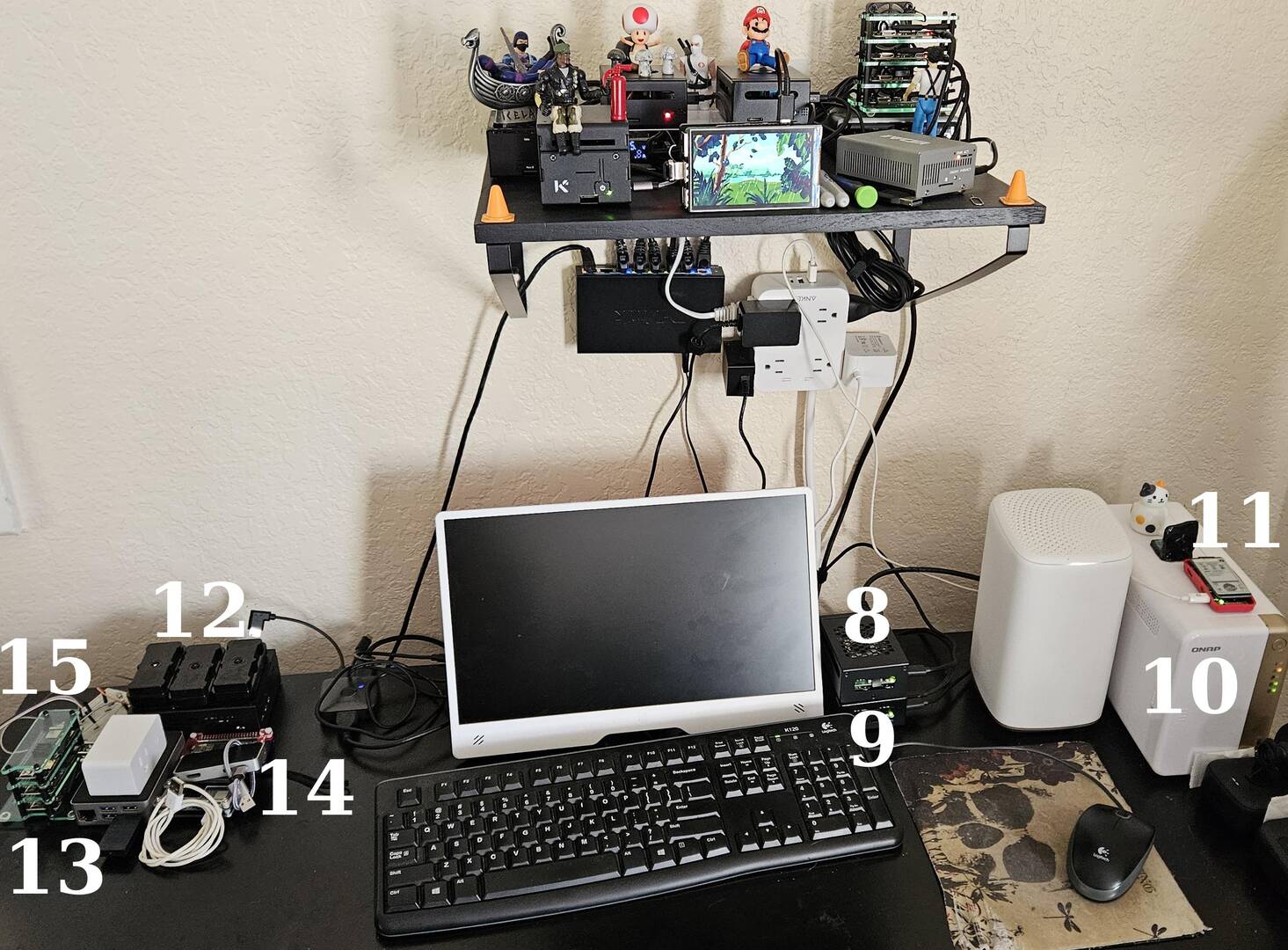
8. Raspberry Pi 5 - 4 GB, Raspberry Pi OS lite bookworm, running Docker containers:
* Syncthing - tertiary instance (remote), receive only, connected via Twingate client. This is supposed to be remote but I had some hardware AND software issues and needed to bring it back to resolve it - it's ready to be remote again
* Twigate tunnel connectors - primary, secondary
9. Raspberry Pi 5 - 16 GB, Raspberry Pi OS desktop trixie: I use this server as a Linux desktop, and also use it for my web site editing with all the required Jekyll/Ruby dependencies installed. It also runs Docker containers:
* Pihole - secondary
* Uptime Kuma - secondary (monitors the primary)
* Speedtest Tracker - secondary, testing internet stability through router directly
* Open Web UI/Ollama - secondary
* Signal cli client - secondary, used for secondary Uptime Kuma notifications
* n8n - web facing UI via Cloudflare tunnel
10. QNAP NAS - 2 x 4 - TB volumes, 1 is used for Windows desktop backups
11. Raspberry Pi Zero 2 W, Raspberry Pi OS lite bookworm, running Bjorn network scanner with e-ink display
12. 3 - Raspberry Pi Zero 2 W, Raspberry Pi OS lite bookworm with RPI Camera Module 3 (2 HD, 1 noIR HD), with Raspberry Pi 5 - 8 GB, Raspberry Pi OS lite trixie with 4 x NVMe disks. I'm testing a DIY home security solution (Motion OS) but I'm having a lot of thermal issues with the RPI Zero/camera modules inside the case.
13. Raspberry Pi 5 - 8 GB, Batocera - emulation server, with Bluetooth dongle for connecting Xbox controller. Currently on my desk because I borrowed it for some testing, usually it sits hidden in my entertainment center connected to the TV via HDMI.
14. 2 x Raspberry Pi Zero 2 W - available for random GPIO or other testing
15. 3 x Orange Pi Zero 2 W - 2 GB, DietPi OS, used for Docker swarm testing (worked nodes)
2025 additions:
This year I discovered the Orange Pi 5 Ultra and added two of those to my existing mini homelab which until then had contained only Raspberry Pi 5s. Overall, 2025 was the year that my homelab was cleaned up (relatively) and I settled on my final hardware/software configurations.
In 2026:
I want to increase my knowledge on monitoring all of these different servers and containers, increase my knowledge with n8n, convert my current standalone containers to Docker swarm containers for resiliency, and finish the home security project. I also want to explore ADS-B flight tracking.
I'm also considering putting all my hardware into one of those snazzy 10" mini-racks I keep seeing. The main reasons I haven't:
* Cost vs benefit - high cost, almost no benefit
* All the money I've already spent on the existing cases/HATs goes out the window
* Come on, look at my lab - a mini-rack could never be this fun


How I got here
I started my home lab back in January when I discovered just how insecure my then Asus router was. Long story short, I knew I had to replace the router and put in something much more robust. I work from home and I depend on my internet connection.
A friend suggested I check out the UDM Pro. It was actually less expensive than the feature rich routers I was looking at for a replacement and I decided to go that route. If any of you enjoy the ease of Ubiquiti's Unifi, you know what that did to me. I had to have WIFI, so POE APs. Using judicious choices from eBay, it was still less than a more expensive gaming router.
Then I discovered Pi-hole. I got it up and running on an HP T630 thin client using Ubuntu server. With these two devices I was hooked. I had a new hobby and was keeping myself safer online.
So...
New for 2025?
Everything!
Current setup:
- Network
- UDM Pro
- 2x U6 Pro AP
- Unifi 24port POE switch
- 2x 8 port Unifi Aggregation switches
- USG Pro
- Spectrum WiFi7 router
- a smattering of cheap Amazon 2.5g switches
- DAC Cables and Fiber SFP+ galore
"Servers"
- Dell Precision 3640 w/ Xeon W-1250 & 64GB
- 3x Dell OptiPlex 8th gen i5 each with 32GB
- Dell OptiPlex 7040 6th gen i5 8GB
- HP T630 Thin client 4GB
NAS
- UNAS Pro w/7 10TB HDD
About My Setup
I as I stated above, I work from home and if I can't work, I don't get paid. So, I want to make sure I can work. The UDM has the option for having dual (or triple now?), fail-over internet connections. To this end, I have both AT&T Fiber and Spectrum cable. The fail-over works beautifully, but I still was noticing in my Unifi logs traffic that wasn't me. I have a LOT of IoT devices and it looked like someone was bouncing off of them into my network. This was even with IDS fully active on the UDM.
The answer? Opnsense. But I also wanted a Proxmox server to play with VMs and such. I like to do lots of research and testing of things before I implement, so this seemed a no brain-er. Put Opnsense on a Proxmox host and pass those NICs through. It worked great. I soon learned 16GB RAM wasn't going to get me far and bumped it to 64GB.
Spectrum door knocked (literally) and offered a gig of bandwidth for $50 with no price hike for 2 years. Well, there was the second internet connection I had been wanting (yes, not needing)...
Now I had to secure a second connection. Since I was still worried about all my IoT devices being on my main network, I devised a plan to completely remove them from it. I purchased a quad gig Intel card and a dual Intel SFP+ card off eBay and set about building 2 Opnsense VMs. Since my plan in the future is to upgrade the Fiber connection past 1 gig, I currently have full 5GB bandwidth from PC to UDM through firewall to modem on that connection. The Cable has 4 interfaces. The basic LAN/WAN and 2 optional, allowing me to have the Spectrum WIFI off one optional port and one for the USG Pro, giving me two isolated SSIDs. Why 2 isolated? I have a monitored home alarm system, I'd rather not have exposed to the other IoT devices.
About this time, I learned about POWER... LOL!
My "Work" PC is a nice gaming rig which I run 7 monitors off of (for work, right?). I have a commercial coffee maker and an additional window AC unit in my home office, also. So, a bottle of my next door neighbor's favorite beverage convinced him to help me run fiber to different rooms in my house (read 'different breakers'). Now I can truly expand. 😀
My current services are:
1) The Opnsense Proxmox server which has Opnsense loaded up with IDS, ClamAV and NTOP-NG. It also runs my secondary pi-hole DNS server. This used to be my test bed, but I stood up the 3 OptiPlex learning about Proxmox clusters and Ceph. Now that it is up and running stably with dual Network connections, I have moved everything off to my cluster except these needed services in case of power outage. I can run my entire internet carbuncle for an hour and a half off the 1500VA UPS Everything now runs under 80W, including the Dell (did I mention I learned about power issues?).
2) The HP T630 has been rebuilt to a 'controller' pi-hole server for nebula sync (12W).
3) The OptiPlex Proxmox cluster has my primary pi-hole server and 2 Docker VMs, the primary running Ubuntu which has what I consider my stable services; Uptime Kuma, Nut-WebGui, Portainer,
and one Alpine Docker VM. My test bed VMs/Services are currently Home Assistant, Jellyfin and NGINX. And, now it seems I have a couple more containers to go play with learning. Thanks for that video!
4) UNAS Pro - Ubiquiti's NAS.
5) Discord Web Hooks! I recently set this up, but its very nice to have Uptime Kuma and NTOP-NG send me alerts. Since Discord has a Cell client, I also know when away from home. I'm thinking about VPNs now to manage while away from home if needed.
6) I have 4 UPS in play and the final OptiPlex handles 3 of them with NUT server.
For 2026
I plan to replace the UNAS Pro or delegate it to just being a desktop share device. I had high hopes for this, but it just can't keep up with the demands a home lab puts on it and is just not conducive to home lab ease of use, yet. To this end, I am rebuilding an old DIY workstation into a Proxmox NAS solution. I'm thinking Proxmox with HDD passed to TrueNAS. This will allow me to utilize all the power of an i9-7940 (14c/28t)
I picked up a pair of HP Z440, cheap and I will likely be combining those with the new NAS into a cluster. This will allow me to use the OptiPlex cluster totally as a test bed. I’m thinking E5-2618L CPUs, a balance of TDP and horsepower (75w 10c/20t). I find CPU core count isn’t nearly as important as RAM for Hypervisors.
Backups! I currently rebuild a Proxmox Backup server every so often and I am now comfortable with it. I need to cement a good backup solution now that I have the base hardware to work with.
Replace my Proxmox boot SSDs with enterprise grade. 1-2% wearout each month doesn't make me feel comfortable. 🙂
Learn more about Jellyfin. Learn GPU pass-through for Jellyfin or stand up a separate Jellyfin box.
Replace my internal WIFI's U6 with a U7 AP.
Set up a VPN to my parents house, allowing them to access my Jellyfin and allow me offsite backups.
Discover more services I can self host!
Build an LLM machine… <shrug> Why not?
#HomeLab #BuildItLikeYouOwnIt #FirewallEverything #YouCantTakeTheSkyFromMe #SelfhostEverything