Vhtforums
Best Home Lab Serve...
 
Share:
Notifications
Clear all

Best Home Lab Server Pics and gear in 2025

Page 1 / 9

Brandon Lee
Posts: 657
Admin
Topic starter
(@brandon-lee)
Member
Joined: 15 years ago

Update Getting ready to pick winner! Post soon to be considered!


Hey everyone, Brandon here. I thought it would be fun to kick off something new for the community as we wrap up 2025 and head into another year of home lab madness.

It has been an absolutely wild year for home lab gear. Between the surge of Mini PCs, ARM boxes showing up in places none of us expected, NVMe hoarding, GPU passthrough on every node we can cram one into, and the never ending Proxmox vs ESXi vs everything else debates, we have all been building, tearing down, rebuilding, and optimizing our labs nonstop.

So let’s see what you’ve been up to.

This new topic is your place to show off your Best Home Lab Server Pics and Gear in 2025. Whether your setup is a full server rack humming in the corner, a stack of Minisforum boxes with Ceph, a DR cluster stretched between rooms, a pile of Raspberry Pis running Kubernetes, a cable-management masterpiece, or the most chaotic spaghetti rack ever built, we want to see it.
best home lab server pics and gear in 2025 2

Share:
• What your setup looks like now
• What you added or removed in 2025
• Any upgrades you’re planning going into 2026
• A short description of your design, your goals, or the story behind your home lab
• Bonus points for photos of before and after evolution shots

Giving away this mini PC! - $799 value!

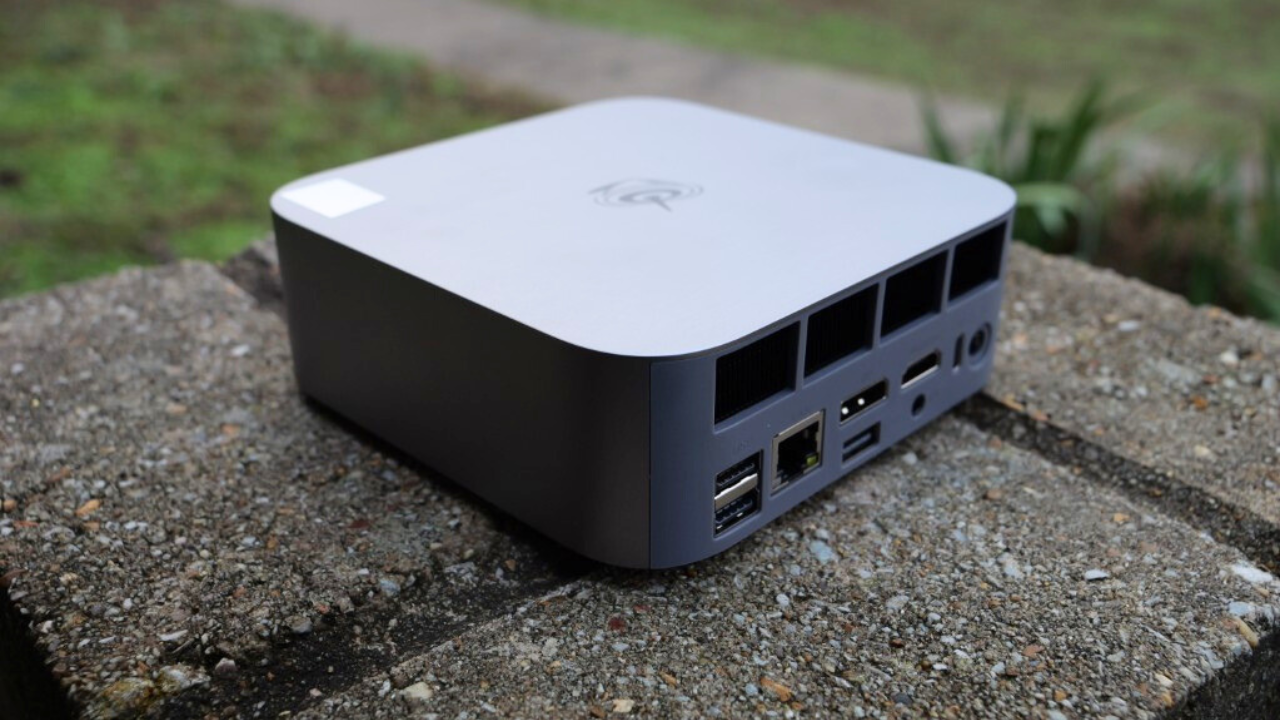
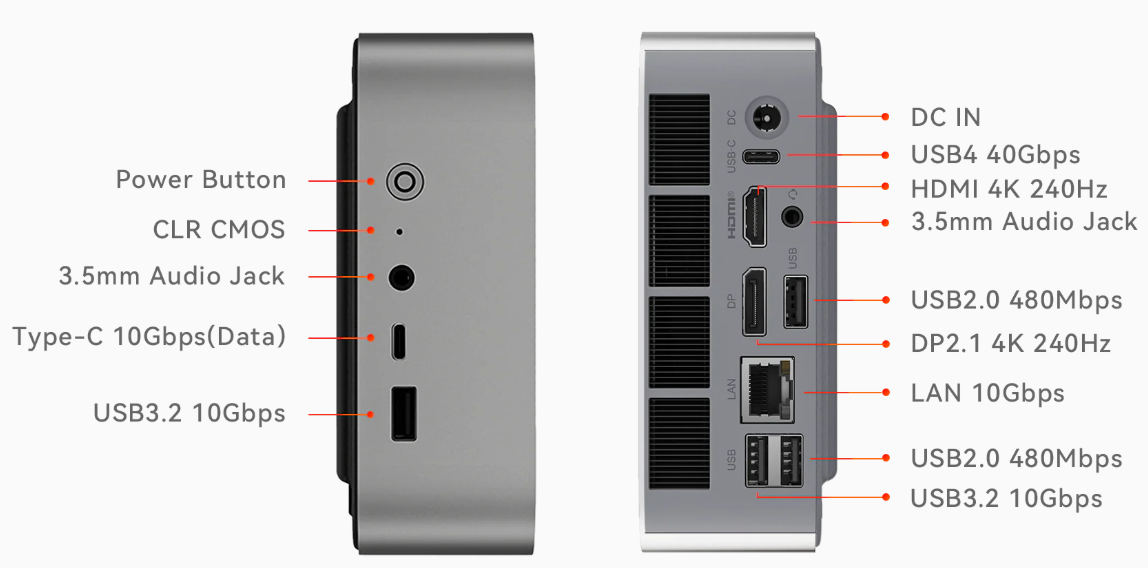
I just finished reviewing the new Beelink SER9 Max and now I’m giving the review unit away to the community! (US domestic shipping only) The SER9 Max I tested comes with 32 GB of DDR5 memory, a fast 1 TB NVMe drive, and built in 10 gig networking, so it is a great little home lab box.
beelink ser9 max 3


io connectivity of the beelink ser9 max


If you want to check out the full review, you can read it here:
https://www.virtualizationhowto.com/2025/12/beelink-ser9-max-review-major-platform-upgrades-and-real-10-gig-networking/

This community is at its best when we all learn from each other’s builds. Half the time inspiration comes from seeing someone else’s approach to storage, airflow, VLAN design, clustering, or even how they zip-tie cables. So jump in and start posting your pictures. Comment on other builds. Ask questions. Steal ideas. Improve your own setup.

And… I’ll just say this…
It might be worth posting your gear photos sooner rather than later. I’m working on something fun that will drop soon, and let’s just say someone who posts in this topic may end up getting something cool for their 2026 home lab plans. More on that later.

Can’t wait to see your setups! Let’s make this the biggest and most inspiring gear thread on the forum this year.

- Brandon


90 Replies
Posts: 1
(@muhammadharper)
New Member
Joined: 1 month ago
PXL 20250212 163614394
20251117 224028
20251117 224019


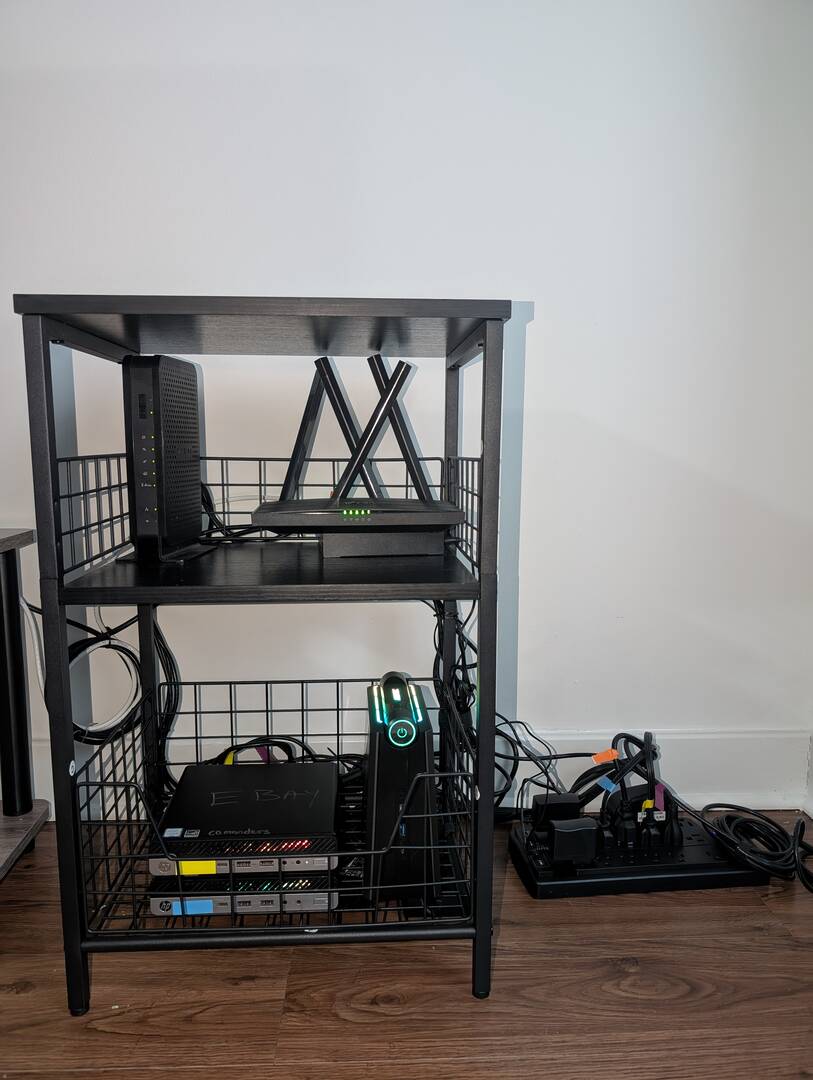
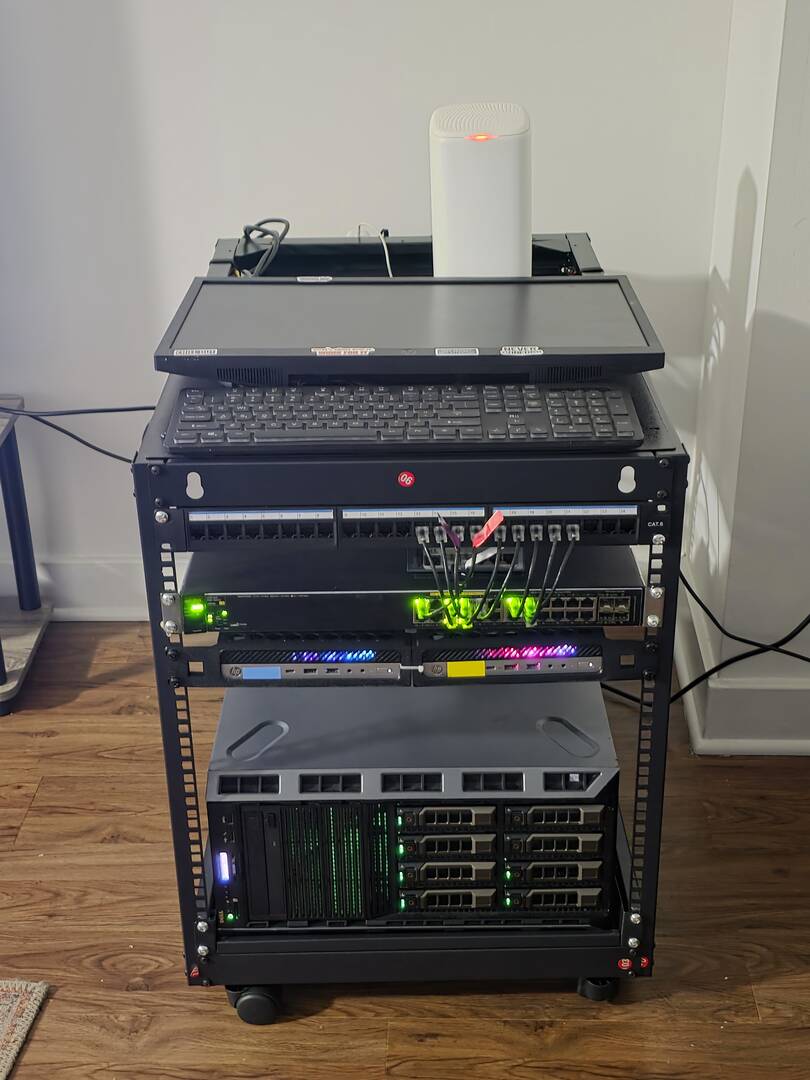
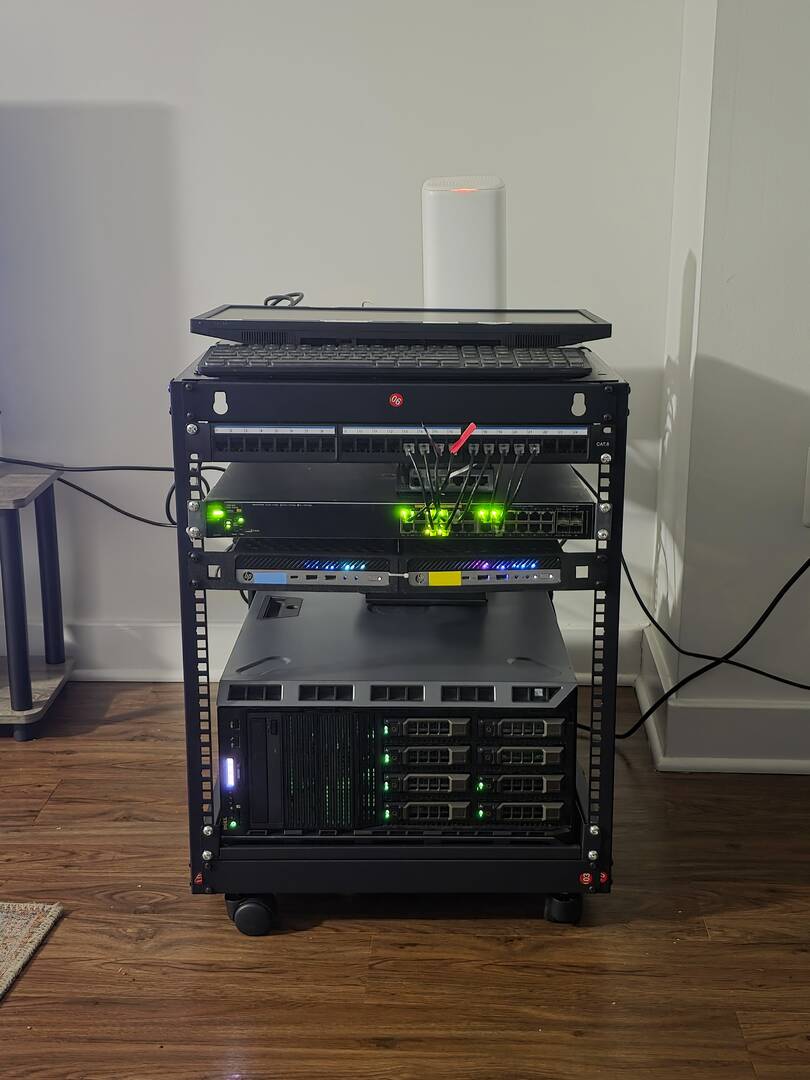
From Shelf to Rack: Building a Cultural Archive & Automation Lab


WHAT MY SETUP LOOKS LIKE NOW


Current Hardware:


Dell PowerEdge T630 - The workhorse

- Dual Xeon E5-2697 v4 processors

- 96GB RAM

- 4x 8TB + 2x 2TB SAS HDDs

- Running Proxmox with TrueNAS VM


2x HP EliteDesk 800 G3 Mini PCs - Cluster nodes

Acemagic Mini PC - Backup server

Aruba 2630 Switch - Core networking

MikroTik hEX S Router 


WHAT CHANGED IN 2025


Added:

- 12U mobile rack enclosure with cable management

- MikroTik hEX S router for better network control

- Structured layout: media server (T630) + automation cluster (mini PCs)

- Purpose-driven configuration instead of just a learning lab


Removed:

- The basic shelf setup (as you can see!)

- Unfocused cybersecurity lab that I wasn't actively using


UPGRADES PLANNED FOR 2026


- UPS system 

- 10GbE networking - When the media library grows

- Offsite backup solution 

- more storage 


THE STORY BEHIND THIS LAB


I originally built a cybersecurity lab hoping to transition careers, but I wasn't using it. I realized I needed something more meaningful something I could actually maintain and that would benefit others.


That's when I discovered my tribe (Hausa) has virtually no digital content archives outside of YouTube and a few scattered platforms. I'm building an alternative archive for Hausa media content preserving our language, culture, and stories in a proper, accessible format.


This project became my way out of depression and my comfort zone. It gave me purpose: building something bigger than myself while learning enterprise infrastructure, automation, and data preservation.


Two months of research and buying. Still a work in progress. Open to suggestions from the community!


What should I run on the automation cluster? Kubernetes? Docker Swarm? I'm all ears!


Reply
2 Replies
Brandon Lee
Admin
(@brandon-lee)
Joined: 15 years ago

Member
Posts: 657

@muhammadharper

Wow, this looks really amazing! Thanks so much for kicking off the thread with a meaningful build story. You’ve clearly put a huge amount of thought into not just the hardware, but the why behind the home lab, and that part honestly hits just as hard as the specs.

I really like the T630s. These are a beast of a workhorse, and pairing it with the EliteDesks and the Acemagic as a backup node gives you a really smart separation between media storage and automation compute. I like how you have evolved from the simple shelf setup to a proper 12U mobile rack. This is great to see a structured layout as part of someone's journey and progression. That is one of the things we all love in home labs. It’s that moment when everything “clicks” and the lab becomes something intentional instead of a pile of experiments.

I also love how you thought through what you have removed. A lot of us have had that phase where we build a cybersecurity lab, then realize we’re not actually using the tools day to day. Refocusing the lab around something that matters to you personally is really inspiring. The project to build a proper archive for Hausa media is definitely meaningful, and I’m glad to hear it gave you purpose when you needed it. 

For 2026, your project list definitely looks spot on. I can confirm that a UPS will give you peace of mind, 10GbE will be a huge performance boost. I know I experienced that when I upgraded from 1 GbE to 10 GbE. This is especially true once the media archive grows. Also, offsite backup is a must for a 3-2-1 strategy to protect your data.

As for what to run on the automation cluster, either Kubernetes or Docker Swarm would fit, but it really depends on the type of automation you want:

If you want something simple and reliable for running your automation workloads, media tools, scheduled jobs, and API-driven services, Docker Swarm will give you clustering with almost zero overhead. Lots of home labbers still love it for that reason. In my honest opinion, it is far from dead for the right use case.

If you want to learn enterprise orchestration at scale, or eventually move into enterprise DevOps or SRE-type roles, Kubernetes on the EliteDesk minis would also be a great choice. They’d make a great 3-node MicroK8s, K3s, or Talos cluster. 

Either way, you are at a point in your lab journey where you could go either direction, or even both. Check them both out.

Keep the updates coming!

Brandon


Reply
(@jamesmoss)
Joined: 2 days ago

New Member
Posts: 3

@muhammadharper what an amazing setup and use case. You have my admiration, sir.


Reply
Posts: 2
(@carl_77103)
New Member
Joined: 1 month ago

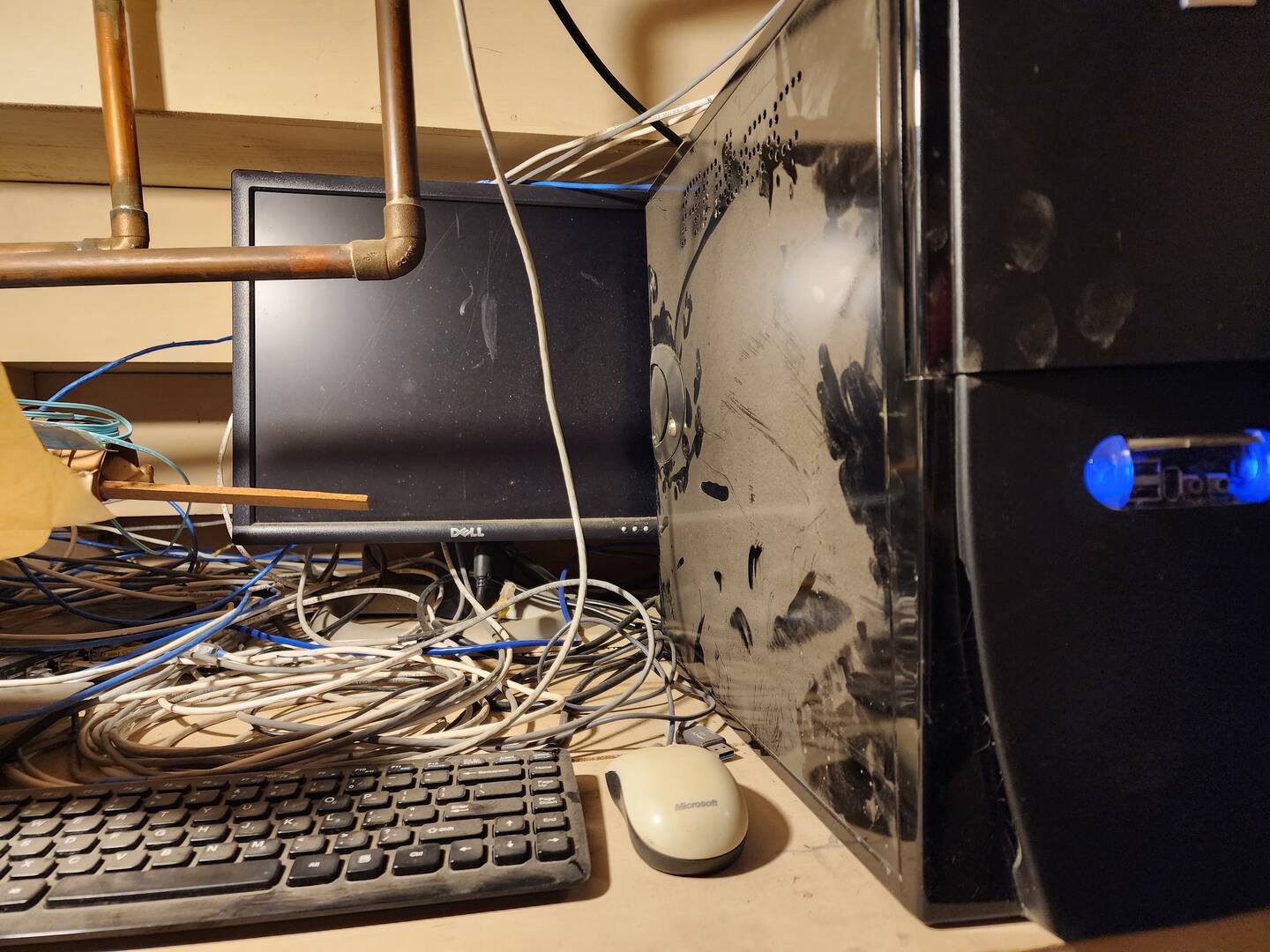
My Current 2025 setup:

Hardware

i3 3rd gen PC 16gb RAM

4x8tb Raid 5

1x4TB Surveillance storage 

8 Port unmanaged POE switch

Software

Homeseer Automation software

ARR Stack

Added this year:

Hard wire to all rooms, TVs, Cameras

Fiber to Office

Plans for 2026

24 Port 10gb managed switch

3 APs

HP z2 gen 4 i7-8700 32gb RAM

Proxmox with Home Assistant VM + existing docker containers

Still deciding which NAS to go with (if any).


The upgrade is multipurpose: The old hardware does not have the transcoding that the 8th gen brings.  I would like to expand into other VMs and containers with significantly more automation hardware (blinds, lights, presence, etc). Also the slightly newer hardware will be more energy efficient (paying for itself in 1-2 years).
20251121 095950


Reply
3 Replies
Brandon Lee
Admin
(@brandon-lee)
Joined: 15 years ago

Member
Posts: 657

@carl_77103 very nice! What wireless system are you looking at rolling out in 2026, which APs? Also, looks like you are a great resource on home automation! Will have to keep this in mind.


Reply
(@carl_77103)
Joined: 1 month ago

New Member
Posts: 2

@brandon-lee I am leaning towards Grandstream switches (GWN7822P 24-Port Layer 3 SW $325) and wireless (gwn7672 $152 ea) because it can do everything I need for a fraction of the Unifi price. Haven't completely ruled out Unifi, but I haven't figured out what I would be getting extra for that hefty premium (~double the total budget)


Reply
(@carlk)
Joined: 2 weeks ago

New Member
Posts: 1

@brandon-lee I started my 2026 plans early!  Got a great deal on the Z2 so I got it in and installed my first Proxmox server.  I have 2 VMs for Home Assistant and Docker.  I think I'm done pulling all the Cat 6 and fiber.  I have a few more low voltage lines to pull for automated blinds and window/presence sensors.  I'm playing with the Unifi designer as I write this to see how much damage it will be compared to Grandstream.


Reply
Posts: 6
(@stephenchr)
Active Member
Joined: 1 month ago
20240622 010722
image

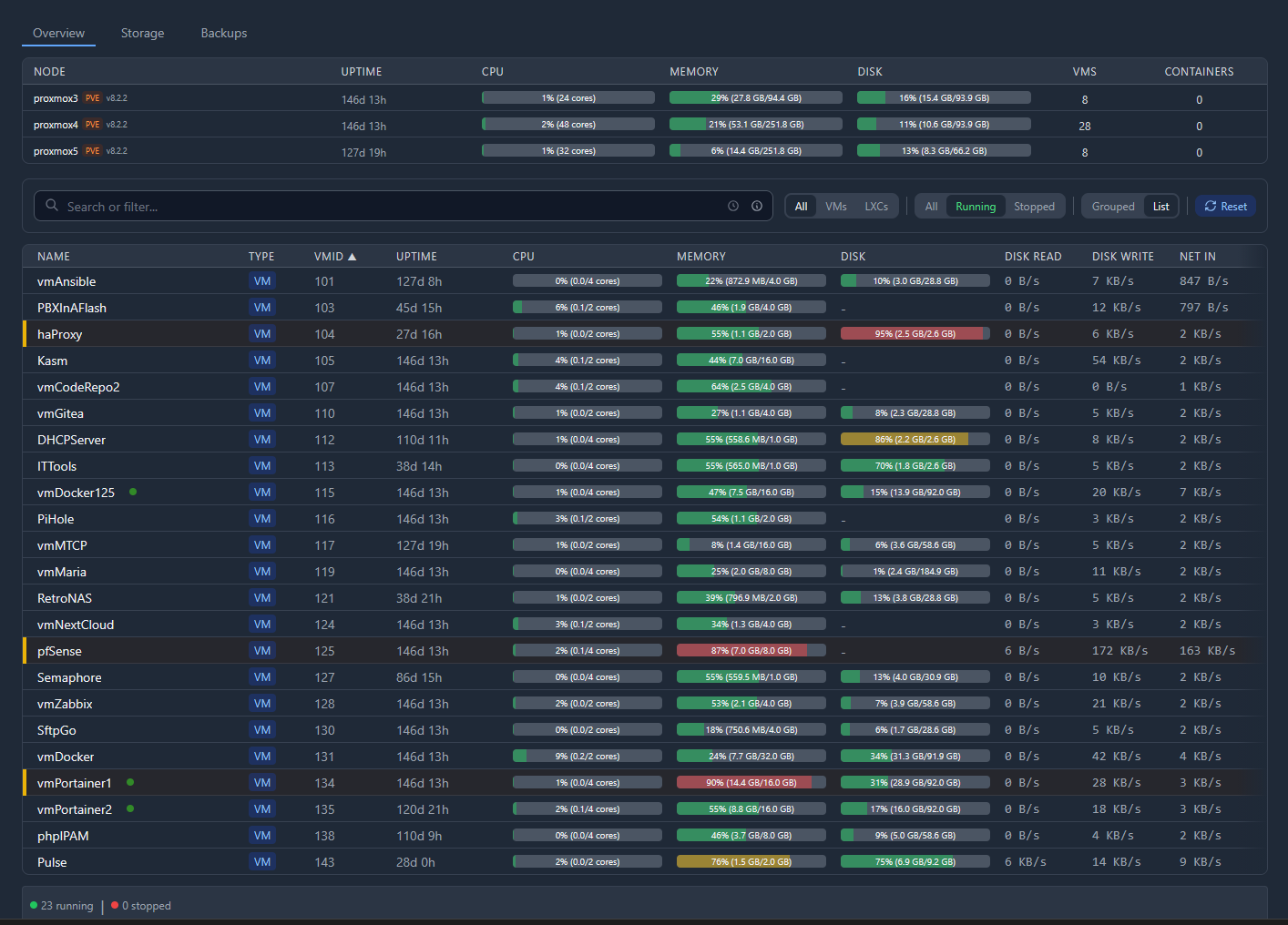
This is my NOC I keep "bragging" about in different places.  It's close to 10 to 11 years old hardware wise, but does me just fine.


Reply
8 Replies
(@stephenchr)
Joined: 1 month ago

Active Member
Posts: 6

Alright, well, that "time to edit" thing bit me in the rear...

So anyways...  Top to bottom;

- 48-port Dell GigE switch with dual SFP ports.  Not populated because I don't have another switch.
- 48 port patch panel, all network cables crimped by me.
- My 8-port VGA based "KVM" setup behind the curtain.  The curtain is generally down to keep the dust from blowing into the machines
- Two 1U Dell servers, and then a 2U Dell server
- Then my TrueNAS machine which is running a super recent Intel(R) Pentium(R) CPU G850 @ 2.90GHz .... .. {blank stare}

Those three machines are actively running all of this:

image


Reply
Brandon Lee
Admin
(@brandon-lee)
Joined: 15 years ago

Member
Posts: 657

@stephenchr awesome that you are running Pulse as well!


Reply
(@stephenchr)
Joined: 1 month ago

Active Member
Posts: 6

@brandon-lee I'm quite happy with it, but it's not in my face enough at this point.  I don't need the notifications, just a visual look-at when walking by.  So I'm setting up a dedicated PC (Low power) that'll run Zorin and just have a full screen browser that's showing that status screen.  There are some "criticals" showing, but a couple are not used, I haven't resized the drive, and although reporting correctly, I've not had a chance to get to them.

The other goal, like I mentioned elsewhere, I want to have a small RPi screen that literally sits in the middle of my quad monitor setup that'll show me when problems come up, but in text mode only.  Having a GUI on a 5" LCD (Or is 3"?  {shrugs} I'm not an 'imperial' guy here) and running a full desktop environment isn't the best thing to have. 😉


Reply
(@stephenchr)
Joined: 1 month ago

Active Member
Posts: 6

Oh.. "Upgrade"... The only upgrade I really want to do is aesthetic, and that's to do with the 48 network cables.  I don't like how "randomly" they look, but the problem is that the offset between the physical switch ports and the patch panel are off, so it's not an easy task to get everything aligned to look great.  I've thought of clear or white zip ties and tie the pairs (Cables that are above/below each other) with three ties to make it maybe look a bit better, but not sure.  Need to source a lot of small ties from somewhere on the cheap.


Reply
Brandon Lee
Admin
(@brandon-lee)
Joined: 15 years ago

Member
Posts: 657

@stephenchr disregard my question above 🤣 I was wondering if you had upgrade plans. Hey also, one thing to note, the slim run cables of just the right length are a great investment. They look so nice! I have the same problem with my current switch being offset as well. It does make things harder.


Reply
(@stephenchr)
Joined: 1 month ago

Active Member
Posts: 6

@brandon-lee I was thinking of 3D printing something that'll bunch them together, or, get some clear heat shrink or something to that effect that'll go "around" the plug but I can heat the shrink and keep them together.  I get the same aesthetic, and the shrink would be a bit more malleable than a 3D print in PLA, and it'd show off the cables, not the filament color.


Reply
Brandon Lee
Admin
(@brandon-lee)
Joined: 15 years ago

Member
Posts: 657

@stephenchr this is awesome! I am right there with you. Been rocking some of my gear that long too. It is hard to let go of what "just works"! and if it is doing the job still. Any plans for 2026?


Reply
(@stephenchr)
Joined: 1 month ago

Active Member
Posts: 6

@brandon-lee One thing I just thought of is that those drives each of those machines have are all running platter drives.  I want to pick up a pack of decent sized normal SSDs (SATA) and plug them in to see if the machine understands what they are.  The back plane here is SAS on all three servers, but SAS SSDs of any size is just stupidly rediculous for what I need.  A bunch of 1-2TB drives would suffice for me.  Rebuild the machine to do a RAID-10 setup (That's all the systems know how to do) and go from there.


Reply
Posts: 2
(@strykerdelkar)
New Member
Joined: 1 month ago

Hi there!
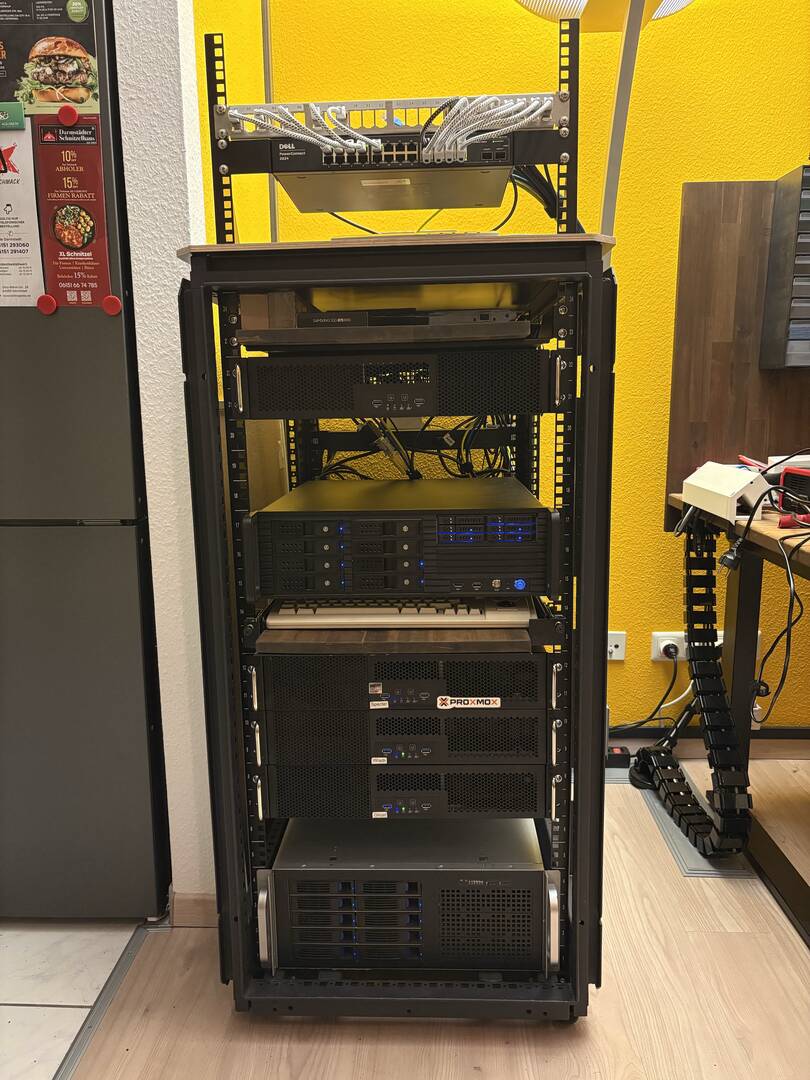
My Homelab is a 24U Dell server Rack, where I switched the top for a texture coated multiplex board, so I could mount the additional 6U Network Rack on top. 

From Top to Bottom:
25 11 21 20 05 26 0564

Dell PowerConnect 2824 (24x Gigabit Ethernet) and 24 Port Patch Panel
- Nothing Fancy, but it does the job. Posts 17-24 are Uplink and connections to the Wall - I have installed LAN in my living room, providing Ethernet to both my Desks and the TV Area. 

OPNSense 
Just hardware so far, setup planned for the following weeks;
Access point is still in shipping.
Is already fitted with an Intel X540-T2 10GbE (future proof, more on that later)

TrueNAS Scale Storage Server
Fun thing to add: I had to go for the X570 Unify because of the amount of PCIe Slots I needed.
- ZFS mirrored boot pool
- 8 TB Striped Mirror (4x 4TB SATA SSDs) as fast storage for NextCloud, Harbor and other Purposes
- 2x12TB RaidZ1 (4x 4TB datacenter HDDs per VDEV) as deep storage for our own Videos from Tournaments
- ZFS 3-way mirror  (3x 1TB NVME SSDs) as special metadata VDEV for deep storage
 

25 11 21 20 04 16 0563

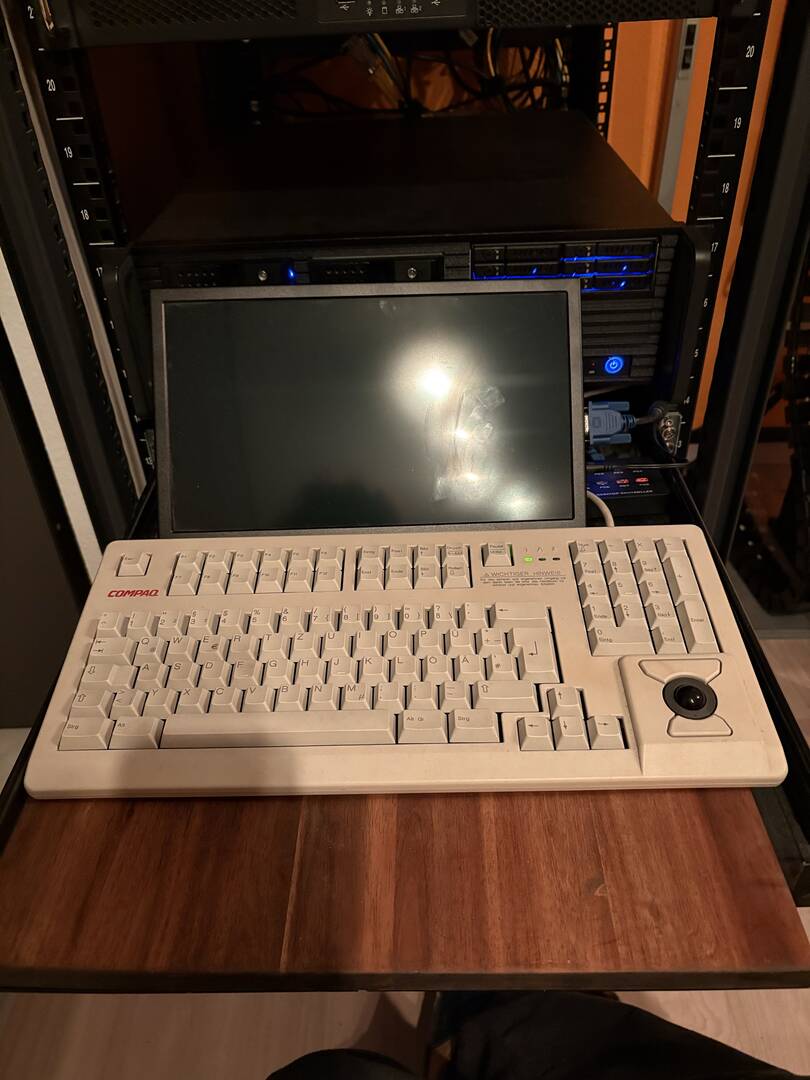
DIY KVM solution
Made of a modified updside down heavy duty rack shelf that came with the rack.
I used an MT-Viki 8-Port KVM, added a small VGA monitor and one of my proudest possessions: an old Compaq keyboard with an integrated Trackball - It even has Cherry MX Brown Switches!

Proxmox VE HA Cluster
Replication and fencing active for all VMs and LXCs; Storage for Containers is done with the ZFS Storage Option from Proxmox
- CPUs: 2x Ryzen 3600, 1x Ryzen 2700X
- Memory: 64GB each (so 192GB in total), whith room for expansion to 128GB
- Storage: one 2TB 4.0 NVMe per Node as container pool

Proxmox Backup Server
ZFS Mirrored Boot Pool
one Storage Pool Consisting of
- 30TB RaidZ2 (5x 10TB Datacenter HDDs)
- 18TB Mirror (2x 18TB Datacenter HDDs)
- ZFS 3-Way Mirror (3x 1TB NVME 4.0 SSDs) as special metadata VDEV
DSC 0814

The Story behind it
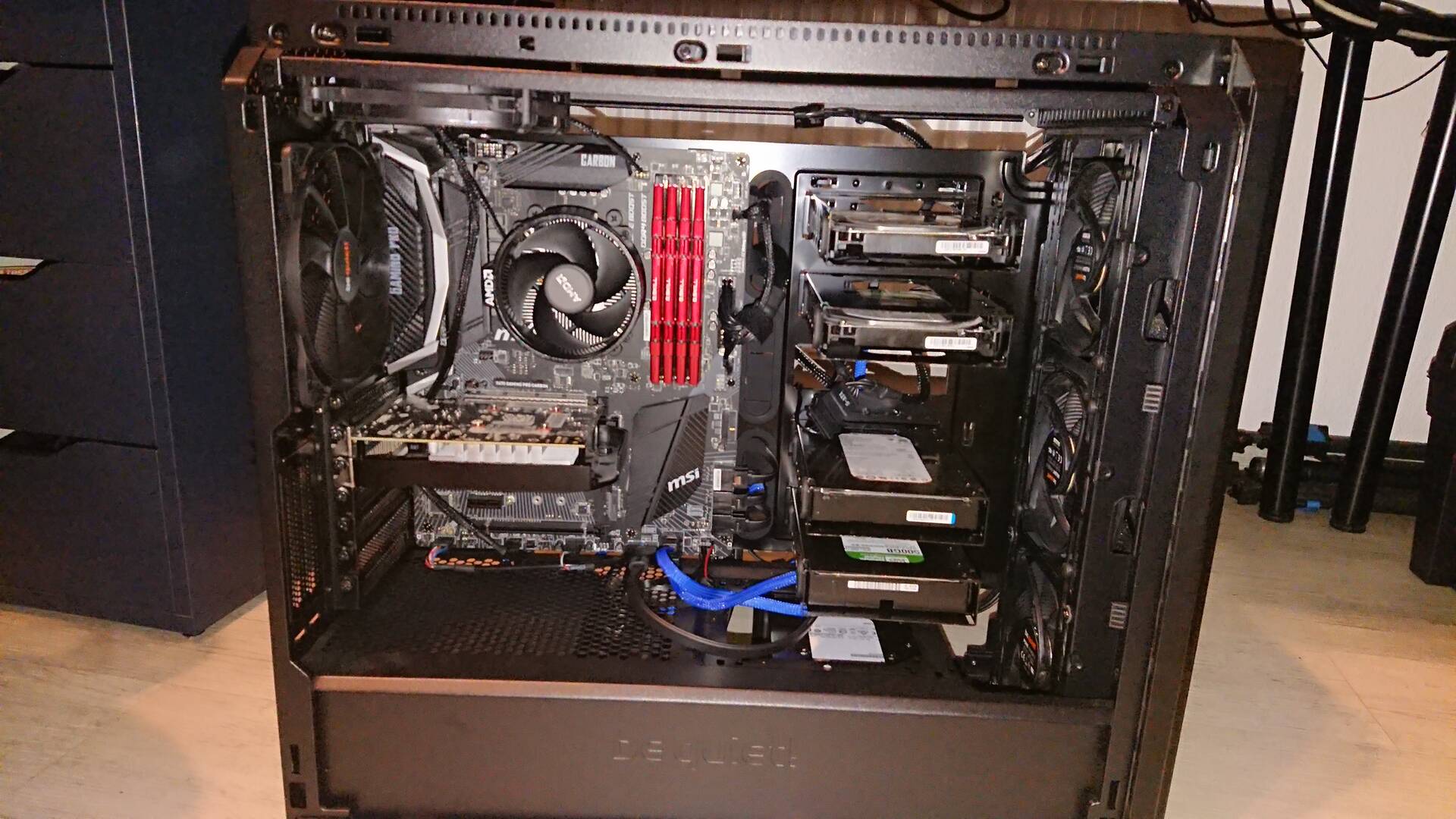
It all started at the beginning of 2020 with one single Proxmox Host (picture on the right) for Nextcloud and Mealie. Over Time IT got more interesting, especially with my working field slowly shifting via DevOps towards Infrastructure, coming from Software Development. At some point I decided to add a Remote Backup Server (local copy of cloud files was already present on at least three machines), and another lump of time later I decided to acquire a rack and switch to a rackmounted PVE cluster, which led to a short and unpleasent dive into Ceph, where I decided I wanted to have a different, less overkill method for shared container storage of the nodes, and went for Proxmox' built in ZFS Storage method.
I then also added a local backup, with a very interesting twist: Instead of running two dedicated Backup Servers (local and remote) each, a good friend of mine (and reason why I have a homelab in the first place) and I decided to each host the respecitve remote backup of the other one on our local backup servers - resluting in less hardware, less room occupied and less total power consumption.

In 2025 I finally started to have others profit of my homelab, for example Nextcloud, Vaultwarden and Mealie, which makes me very happy - family and friends have a secure home for their data and personal information now, instead of relying on big corpos.

My current goals - other than not relying on external services - are to learn new skills and tools with my homelab. In the end I do enjoy it very much and it helps me as work as well, as I am now doing exactly the same in job and homelab - for now, this is a dream come true! 

Biggest Changes in 2025
- finally put in the effort to plan monthly maintenances - for now it's just iOS automations that fill a reminders list, but it works fine for me!
- finally added Grafana and Pulse for Monitoring and Alerting
- added the wooden plate on top and migrating networking to there - in preparation for my next "because I c can"-idea - see 2026 😉
- added Spinning Rust to the Storage Server to provide Mass Storage for videos - 3-500GB every other summer weekend are a bit too heavy for "just" 8TB of SSD storage. Included that as an external storage in Nextcloud, so it can be used as a dedicated folder
(- technically switching from an AVM Fritz!Box to Opensense and Ubiquiti access point, which has not happened yet, but will before the end of the year)

Plans for 2026
- metered PDU with switch delay and Network Management/Monitoring
- Virtual workstation with SSH access to all hosts and VMs and remote access via rustdesk
- "UPS" in form of a 2kWh Ecoflow Stream AC Battery - cheaper than a regular UPS and will do for my needs, especially as I plan to aquire solar for my balcony
- Automation with Ansible and Terraform
- Cache for Uplay and Steam 
- ...and a 4U water cooled Gaming-/Workstation that will be able to handle 1440P gaming and video editing, and provide cloud gaming as well. I could just use my existing PC for cloud gaming, but where would be the fun in that?


To sum up the current endeavours in my homelab: Science isn't about why, it's about why not!


Reply
2 Replies
Brandon Lee
Admin
(@brandon-lee)
Joined: 15 years ago

Member
Posts: 657

@strykerdelkar

Wow… this is an absolutely fantastic build and an even better story behind it. You can really feel the progression from “one Proxmox host in 2020” to a full HA cluster, shared backup design, proper storage tiers, and a thoughtfully planned network layout. This is exactly the kind of evolution so many of us go through, but you’ve taken that a step further with a really good design and execution of it.

The wooden top plate for the 6U rack is genius by the way! Also, love the DIY KVM with the vintage Compaq keyboard and trackball!

I really like the storage setup too. The combination of ZFS mirrors, RAIDZ, and a special metadata VDEV is such a smart way to keep performance predictable, especially considering your mix of fast SSD workloads and “summer weekend” video ingest from tournaments. 

Also love the remote-backup-swap idea with your friend. That’s the best kind of homelab collaboration especially if you have friends with the same hobby and learning goals. Definitely reduces hardware and power costs for both of you and gives real offsite protection without relying on a cloud provider.

Nice 2026 plans also! I have been wanting to do the same with a power-metered PDU with switch-delay. Keep us posted on how the balcony-solar-backed EcoFlow setup works too, I would definitely be interested in that. Keep sharing updates as you start knocking out the 2026 plans. I know a lot of us will be watching that journey play out.

And I definitely agree with your statement on the "why not"....I have learned so much more in my journey that way. Very cool.


Reply
(@strykerdelkar)
Joined: 1 month ago

New Member
Posts: 2

@brandon-lee 
Thanks you for the kind words 🙂 

The greatest advantage for our remote backup setup is, that we always have a technician on site for direct access, instead of leaving a machine at parents' or grandparents' houses where you always have to first get to in order to fix stuff. And we're like "yep, I'll look into it after work", if problems arise that are not remotely fixable.

I'll gladly share my progress through 2026! I am planning 2kWp for my solar generator, which is the absolute maximum for those small easy-to-use setups, and pair it with 2x2kWh of energy storage. I chose ecoflow because their system allows me to have decentralized storage. Will be a fun project!


Reply
Page 1 / 9