Vhtforums
AI Assistant
Window server 2016 ...
 
Notifications
Clear all

Window server 2016 docker install

5 Posts
2 Users
1 Reactions
2,753 Views
Posts: 5
Topic starter
Translate
English
Spanish
French
German
Italian
Portuguese
Russian
Chinese
Japanese
Korean
Arabic
Hindi
Dutch
Polish
Turkish
Vietnamese
Thai
Swedish
Danish
Finnish
Norwegian
Czech
Hungarian
Romanian
Greek
Hebrew
Indonesian
Malay
Ukrainian
Bulgarian
Croatian
Slovak
Slovenian
Serbian
Lithuanian
Latvian
Estonian
(@dylee)
Active Member
Joined: 2 years ago
[#143]

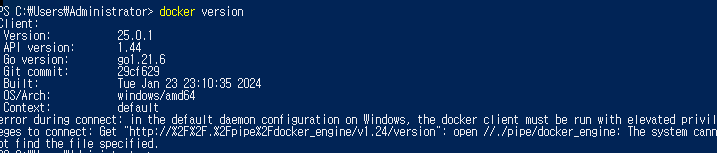
"I'm trying to install Docker on Windows Server 2016. While the Docker client is running, the Docker server is not starting, and I'm encountering such an error. How can I resolve this issue?"


2
1
3

4 Replies
Brandon Lee
Posts: 686
Admin
Translate
English
Spanish
French
German
Italian
Portuguese
Russian
Chinese
Japanese
Korean
Arabic
Hindi
Dutch
Polish
Turkish
Vietnamese
Thai
Swedish
Danish
Finnish
Norwegian
Czech
Hungarian
Romanian
Greek
Hebrew
Indonesian
Malay
Ukrainian
Bulgarian
Croatian
Slovak
Slovenian
Serbian
Lithuanian
Latvian
Estonian
(@brandon-lee)
Member
Joined: 16 years ago

@dylee welcome to the forums! I see you are having issues with Docker on Windows Server 2016. How did you install Docker on this server?


Reply
Posts: 5
Topic starter
Translate
English
Spanish
French
German
Italian
Portuguese
Russian
Chinese
Japanese
Korean
Arabic
Hindi
Dutch
Polish
Turkish
Vietnamese
Thai
Swedish
Danish
Finnish
Norwegian
Czech
Hungarian
Romanian
Greek
Hebrew
Indonesian
Malay
Ukrainian
Bulgarian
Croatian
Slovak
Slovenian
Serbian
Lithuanian
Latvian
Estonian
(@dylee)
Active Member
Joined: 2 years ago

I faced the error "dockerdefault_dockersearchindex.json does not exist" while trying to follow the instructions from the provided GitHub link. When attempting to install using Microsoft's guide, it appeared that the CE version is not compatible with Windows Server. As a result, I'm uncertain about the next steps for installing the Enterprise Edition (EE) version.


Reply
2 Replies
(@dylee)
Joined: 2 years ago

Active Member
Posts: 5
Translate
English
Spanish
French
German
Italian
Portuguese
Russian
Chinese
Japanese
Korean
Arabic
Hindi
Dutch
Polish
Turkish
Vietnamese
Thai
Swedish
Danish
Finnish
Norwegian
Czech
Hungarian
Romanian
Greek
Hebrew
Indonesian
Malay
Ukrainian
Bulgarian
Croatian
Slovak
Slovenian
Serbian
Lithuanian
Latvian
Estonian

I also downloaded it by referring to this part: https://docs.docker.com/engine/install/binaries/#install-server-and-client-binaries-on-windows .


Reply
Brandon Lee
Admin
(@brandon-lee)
Joined: 16 years ago

Member
Posts: 686
Translate
English
Spanish
French
German
Italian
Portuguese
Russian
Chinese
Japanese
Korean
Arabic
Hindi
Dutch
Polish
Turkish
Vietnamese
Thai
Swedish
Danish
Finnish
Norwegian
Czech
Hungarian
Romanian
Greek
Hebrew
Indonesian
Malay
Ukrainian
Bulgarian
Croatian
Slovak
Slovenian
Serbian
Lithuanian
Latvian
Estonian

@dylee Can you take a look at the following link and install it using the command line option listed at the bottom?

https://learn.microsoft.com/en-us/virtualization/windowscontainers/quick-start/set-up-environment?tabs=dockerce

Invoke-WebRequest -UseBasicParsing "https://raw.githubusercontent.com/microsoft/Windows-Containers/Main/helpful_tools/Install-DockerCE/install-docker-ce.ps1" -o install-docker-ce.ps1

Then, run this command:

.\install-docker-ce.ps1

Reply