Sometimes, you wonder to yourself if you are a self-hoster, am I doing this right? What can I do to make my setup better? When you first start out, progress is pretty easy to see. You stand up your hypervisor, maybe a few VMs and then you start delving into Docker. Progress may seem like it is happening every day. However, as time goes on, things will quieten down and you may wonder if you are doing things right or making “progress”. The truth is, mature and well put together labs often look boring from the outside. The real signals of progress are things that you see in terms of habits, decisions, and how you react when things break. Let’s take a look at patterns that show up which show you things are going the right way in your home lab that show you are maturing as a self-hoster.
You can rebuild your lab without panic
What separates a lab that isn’t put together well from one that is, isn’t necessarily how often they break, but how these are rebuilt when things go wrong. In your beginning days, if you have a failed boot drive or corrupted config, these can feel catastrophic. It might be tough to remember what you had configured, where your data lives, or what tweaks you have been making lately or even months ago.
A sure sign that you are building things the right way is that rebuilds stop being emergencies and they start being routine. You start to view things as “immutable” and easily recreated. You understand what matters. Configuration is documented or scripted enough that rebuilding is something you can do in a couple of hours rather than days or not being able to recover.
Check out: Why You Need an Immutable Home Lab Server OS.
This shift starts to happen when you view your infrastructure as disposable and able to be rebuilt without much fuss. This is where you start getting into the realm of a DevOps mindset and your lab will become 10x more resilient.
You are:
- Ok with restoring to another server you have or mini PC, the server itself isn’t special
- Running most of your apps in containers
- You have your Docker Compose or Kubernetes configs in Git
- You have scripts to easily redeploy your Linux Docker hosts
- Your data is backed up and you know it is restorable
You delete more than you deploy
If you find yourself cleaning up unused services, shutting down VMs, shrinking your lab footprint and decommissioning projects, that is a very good sign. It means you are truly looking at the value that certain projects are bringing to your home lab instead of just running things to run them.
Mature labs over time grow lean. They have very few long running services. The roles that everything plays is much clearer and there is less clutter. Deleting things is not failure, it is part of how you refine your home lab.
As an example, check out 5 ways you can cleanup your Docker host: Docker Overlay2 Cleanup: 5 Ways to Reclaim Disk Space.
You care about apps and services more than the platforms
I know when I first started out my career and got into virtualization back in the day, we were all in love with the infrastructure and the technologies that ran things. While I still geek out on technologies and things that are running underneath the hood, these are no longer the priority.
At some point, the platform no longer is the most important thing. It is the applications, services, and your data. No matter if you are running Proxmox, VMware, Kubernetes, Docker, or something else, these are just secondary to what you want to accomplish with your self-hosting journey.
You know when you start building the right way, you will stop asking questions like, “which hypervisor is the best one” to “what problem am I trying to solve?” You choose the right tool for the job instead of trying to do what is popular or trendy.
You stop chasing perfect uptime
When you first start, if you are like me, you often chase enterprise style uptime. You think to yourself, that everything must be online all the time. Everything must be redundant and when something goes down, this is failure.
However, as you grown in your skillset a more mature mindset takes over. You realize that uptime is really only important for things that provide daily value. You don’t have to literally keep “everything” up and running. You start to concentrate on those services that are truly valuable and focus on how you can make them more resilient.
If you can power down half of your lab without worrying too much about things, you have probably crossed an important threshold in your home labbing journey. You are no longer maintaining infrastructure just to maintain it. You are maintaining it for learning and the value it brings to the table.
You test failures on purpose
If you intentionally introduce failure into your home lab, this is a pretty major signal that you have matured in your home lab. You reboot nodes during the day and you may even simulate disk loss or kill containers or other things on purpose to see what happens.
Check out my project to introduce a “chaos monkey” in my home lab: Home Lab Chaos Engineering Unleashed with LitmusChaos.
These types of behaviors appear when you trust your understanding of the system and you are confident that you can get things back up and running and you know your data is resilient and protected. If you learn to test failures your confidence will build very quickly, way more than reading documentation and thinking about what you might do if something bad happens.
Documentation happens as just a normal part of your lab
When you first start out, documentation feels like a chore and something that you probably hate to do if you are like me. You tell yourself you will remember the important settings you need to remember or you will write things down later. However that time rarely comes.
When you start building things the right way, documentation feels like it is no longer optional. And, if you start doing things the right way, in Git, your infrastructure as code will document itself. A key signal is that documentation becomes natural instead of forced and when something breaks, you fix it, and you document the solution because you know it could happen again.
Learn about documenting your home lab: How to Document Your Home Lab (The Right Way)

You trust your automation
When you start trying to automate things, you may even tell yourself, I can do this just as fast by hand as I can trying to automate it. Also, automation at first is scary. However, a big shift happens when you stop relying on your own memory and manual tasks you complete and start relying on and depending on automation. Manual steps will start to feel fragile.
As you mature in your self-hosting journey, automation sneaks in as part of your infrastructure naturally. You will start using things like Terraform, Ansible, shell scripts, CI/CD pipelines, and even simple Docker Compose files will start taking over these manual steps.
Automation doesn’t have to happen all at once. Pick one thing a month to automate and you will be surprised at the end of a year just how automated your home lab will become. over time this will help you build a lab that is consistent, repeatable, and what I think is probably most important, fun.
Your lab fits your physical space and life
If your lab doesn’t fit your living space or daily life, chances are it won’t last long. You must think about noise, heat, power draw and physical aspects of your lab. These are way more important han you might think.
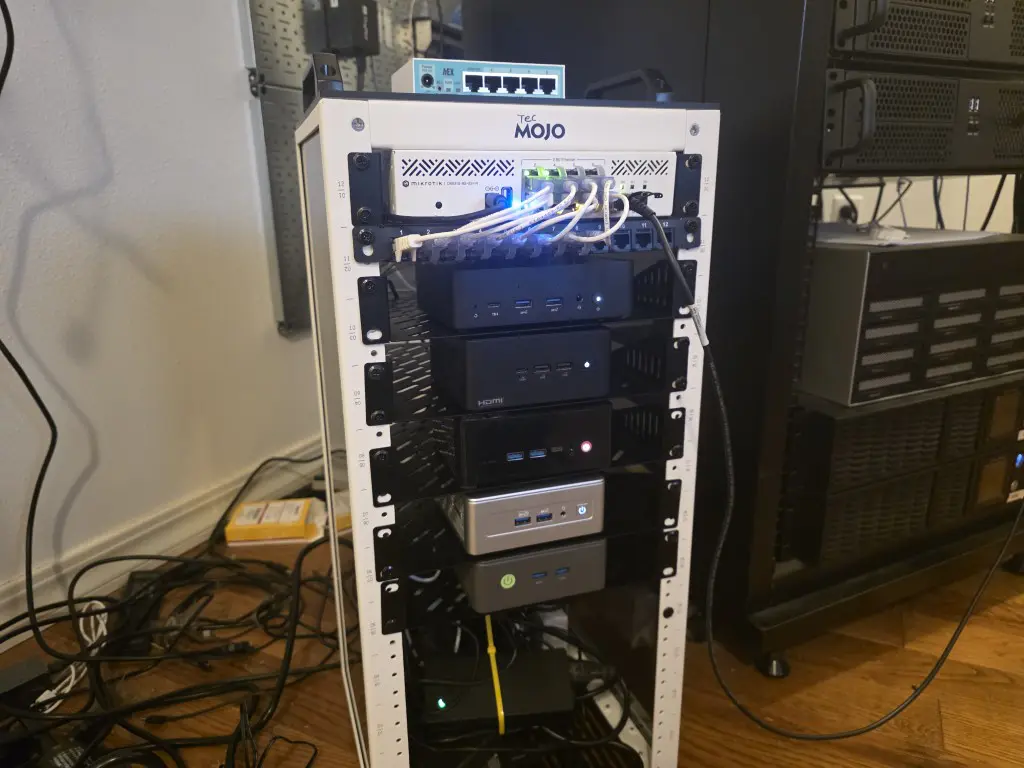
When you are building your lab the right way, your lab fits your environment and not the other way around. Mini PCs will start to replace loud servers. Mini racks will replace full size server racks. Power usage will become something you monitor and care about. These are not things to consider a downgrade. Consider it an optimization. A lab that runs quietly in an unattended way is far more valuable than one that you have to be constantly tinkering on just to make it work.
Check out my Proxmox and Kubernetes mini rack project for 2026: Inside My Mini Rack Proxmox and Kubernetes Home Lab for 2026.
You learn something new often
This is the final signal that we will take a look at and that is if your home lab is what it should be, it will continue to teach you new things each day, week, year, that you run it. If you have a lab that continues to help you appreciate new aspects of familiar technologies or that helps you learn new technologies entirely, this is a good sign.
Maybe one month you learn better backup strategies. Another month you finally understand networking behavior that used to confuse you. Another month you simplify a workflow that used to feel clunky, or you may automate something that you used to do manually.
If your lab is still allowing you to learn without constant rebuilds or dramatic changes, you are doing it right. The goal is not endless novelty, but instead it should be sustained growth and learning.
Wrapping up
We all make mistakes in the home lab, but overall, that is part of the learning process. If you are not having to troubleshoot anything, you are probably playing it too safe. Hopefully, these few signals we have discussed resonates with you and your home lab. Ultimately, if you are still learning and enjoying it, that is what matters, but it is good to know a few things to consider to know whether you are on the right path. How about you? What signals do you look for in your home lab to know you are on the path you want to be on? I would be curious to know. Please share it in the comments.

Google is updating how articles are shown. Don’t miss our leading home lab and tech content, written by humans, by setting Virtualization Howto as a preferred source.
About The Author